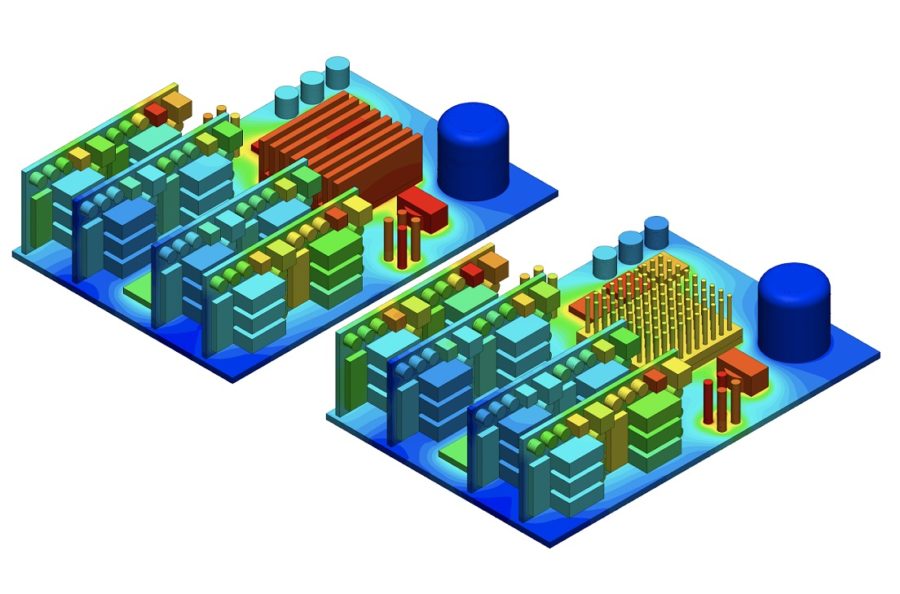

Thermal management decides how long an electronic product lasts and how close it can run to its rated performance. Increased performance requirements and functionalities in a smaller space generate more unwanted heat within the casing of electronic equipment, and most of the damage that heat causes is gradual: components degrade over time instead of failing on the test bench.
The expected life of any component is affected by the temperature at which it operates. A commonly cited rule of thumb is that reducing a component’s temperature by 10 °C can double its expected life. The decisions that set those temperatures (materials, fan and heat sink placement, enclosure size) are made early in design, when they are cheapest to change.
Run your first electronics thermal simulation
Set up a conjugate heat transfer simulation in your browser in minutes. No installation, special hardware or credit card is required.
What is thermal management for electronics?
Thermal management for electronics is the design work that keeps every component below its maximum rated temperature by moving heat from where it is generated to the surrounding air or a coolant. Electronics cooling is the same discipline under another name, and the two terms are used interchangeably.
Why do electronics need cooling in the first place? The second law of thermodynamics dictates that energy usage results in waste heat. In electronic devices, an electric control current causes transistors to switch on and off or amplify electronic signals.
Modern processors contain billions of transistors, and the current needed to switch them generates heat. Most electronic circuits also contain resistors that work to control the flow of the current to certain components. The electrical energy dissipated in these parts is converted into heat and adds to the thermal energy present within an enclosure.
At its worst, overheating within an electronic device melts components. Most often, however, engineers are not able to see immediate damage or failure; instead, products degrade over time. For example, in LED chips a difference of only a few degrees cooler can result in thousands of extended hours of product life.
Junction temperature and the heat path
The limit that matters is usually the junction temperature, the temperature inside the semiconductor die. Manufacturers state a maximum in the datasheet, commonly 125 °C to 150 °C for silicon devices. Heat leaves the junction through three mechanisms:
- Conduction through solids: the die, solder, thermal interface material, PCB copper and the heat sink base.
- Convection from surfaces into air or a liquid coolant, either natural (driven by buoyancy) or forced by a fan or pump.
- Radiation from surfaces to their surroundings, which matters most in sealed, passively cooled enclosures.
Each step in that path adds thermal resistance. The junction temperature is the ambient temperature plus the dissipated power multiplied by the total resistance between junction and ambient: Tj = Ta + P × Rθja.
Thermal integrity is one of the most important considerations for electronic packaging that affects its product lifecycle. The thermal impact on the enclosure is a key factor for material selection, as well as informing cooling and form factor decisions that eventually determine the weight, size, and cost of the final design. Therefore, it is vital that designers determine the heat signatures of their systems.
Electronics cooling methods
Electronics cooling methods split into passive methods, which need no extra power (natural convection, heat sinks, heat pipes and vapor chambers), and active methods, which use a fan, a pump or an electrical input (forced air, liquid cooling, thermoelectric and immersion cooling). Heat load, heat flux, available space, noise and cost decide which one a design needs. The trade-offs between the two families are covered in active vs passive cooling.
| Method | Passive or active | How it moves heat | Typical use |
|---|---|---|---|
| Natural convection | Passive | Buoyancy-driven airflow over surfaces and through vents | Low-power devices, sealed and outdoor enclosures |
| Heat sinks | Passive or active | Fins add surface area for convection | Processors, power devices, LEDs |
| Forced air | Active | Fans or blowers drive air across components | Computers, telecom and industrial electronics |
| Liquid cooling and cold plates | Active | A pumped coolant carries heat from a cold plate to a radiator | High-power electronics, servers, EV power electronics |
| Heat pipes and vapor chambers | Passive | A working fluid evaporates at the hot end and condenses at the cold end | Laptops, phones, compact high-flux parts |
| Thermoelectric (Peltier) | Active | Electric current pumps heat across a semiconductor junction | Image sensors, lasers, cooling below ambient |
| Immersion cooling | Active | Components sit directly in a dielectric fluid | High-density compute in data centers |
The heat transfer coefficient shows why the methods differ so much. Moving from natural convection in air to forced air raises it by about an order of magnitude, and liquids and phase change go much further:
| Process | Typical heat transfer coefficient (W/m²·K) |
|---|---|
| Natural convection, gases | 2 to 25 |
| Natural convection, liquids | 50 to 1,000 |
| Forced convection, gases | 25 to 250 |
| Forced convection, liquids | 100 to 20,000 |
| Boiling and condensation | 2,500 to 100,000 |
Typical ranges from Incropera et al., Fundamentals of Heat and Mass Transfer.
Natural convection
Natural convection is the simplest method: air warmed by hot surfaces rises and draws cooler air in behind it, with no fan or moving part. It suits low-power devices and sealed enclosures, but its low heat transfer coefficient means it needs large surfaces, vents placed along the flow path, and free space around the enclosure. The SimScale webinar on natural convection and fan cooling compares the two on the same enclosure.
Heat sinks
A heat sink lowers component temperature by adding surface area for convection, usually as aluminum or copper fins attached to the component through a thermal interface material. Fin count, spacing and orientation have to match the airflow: fins packed too tightly choke natural convection, and fins set across the flow path waste a fan. Design rules are in heat sink design, and heat sink simulation covers testing them.
Forced air
Forced air cooling uses fans or blowers to raise the heat transfer coefficient about tenfold over natural convection. The flow a fan delivers depends on the pressure drop through the enclosure, so fan selection is a fan curve problem, covered in modeling fans below.
Liquid cooling and cold plates
Liquid cooling moves heat through a pumped coolant, usually water or a water-glycol mixture, flowing through a cold plate mounted on the hot components. Liquids carry far more heat per unit volume than air, so cold plates handle heat loads that air cannot, such as inverters and other power electronics, at the cost of pumps, plumbing and leak risk. See cold plate cooling design and cold plate simulation.
Heat pipes and vapor chambers
Heat pipes and vapor chambers spread heat passively with a working fluid that evaporates at the hot end and condenses at the cold end. Their effective conductivity is many times that of solid copper, which is why they carry heat from a small, hot die to a larger fin stack in laptops, phones and server CPU coolers.
Thermoelectric cooling
Thermoelectric (Peltier) coolers pump heat with an electric current and can hold a component below ambient temperature. They are inefficient, so the hot side has to reject the component’s heat plus the cooler’s own electrical power. That limits them to small loads such as image sensors, lasers and precision instruments.
Immersion cooling
Immersion cooling submerges components in a dielectric fluid. In single-phase systems the fluid stays liquid and is pumped through a heat exchanger; in two-phase systems it boils on hot surfaces and condenses above them. It is used mainly for high-density compute, as in these data center cooling simulation examples.
For specific applications, see LED heat dissipation, CPU cooling systems and electronics enclosure cooling.
Why rules of thumb fail in electronics thermal design
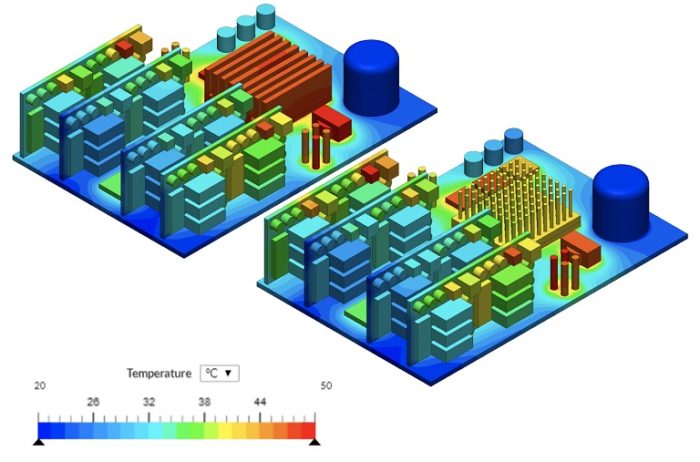
Rules of thumb fail because a component’s temperature depends on the whole heat path at once, so adding a heat sink, a fan or a vent can leave a hot spot where it is or move it somewhere else. Overreliance on experience or intuition and physical trial-and-error testing to predict the cooling of complex electronic systems is expensive, time-consuming, and highly unreliable.
Adding heat sinks or fans does not fix every problem
As heat needs to be dissipated or moved away from sensitive electronic components, thermal interface material is used to conduct thermal energy to components like heat sinks. Heat sinks work by dissipating heat into the surrounding air and fans increase the airflow to support this heat loss mechanism, so one might be inclined to believe that simply adding more will equate to improved thermal management.
However, engineers designing devices that are increasingly smarter, and smaller, understand that there is always a tradeoff between space, cost, and energy consumption. By installing an additional component, space on the board is occupied, energy demand is increased and overall production cost goes up. With the installation of additional parts to a circuit, the probability of failure increases, as well.
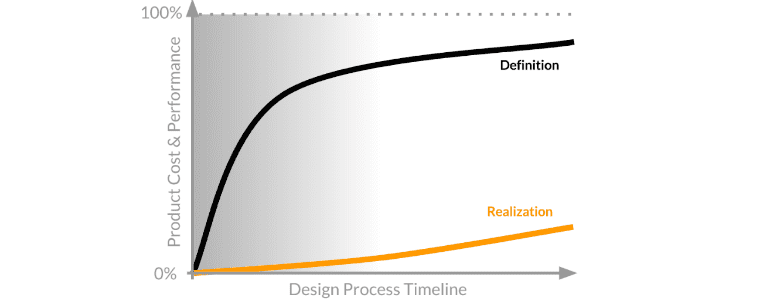
These considerations show that smarter, more cost-effective thermal management comes from early-stage design decisions. Simulation allows teams of designers to identify problems before incurring the cost associated with traditional physical prototyping. QRC Technologies found this on its RF test equipment: thermal pads between the hard drives and the boards were not enough, and the controller chip was shutting down to protect itself (see customer results).
The stage when you begin to explore the design space and define your product concept is when the most impactful design decisions are made. Simulation plays a fundamental role in those early product development stages: for the final product, this can mean lower production costs, more efficient energy consumption, lower failure risk, and more. While physical prototyping cannot (and should not) be eliminated entirely, simulation can be an effective tool to validate your design while saving time and money in the process.
With the aid of engineering simulation, electronics designers and engineers can test four decisions that rules of thumb usually settle by default.
Validate material decisions
The thermo-physical properties of the materials you choose can largely determine the thermal performance of the final design, making the material selection one of the primary design decisions. The thermal conductivity of materials such as copper or silicon can change over the expected range of operating temperatures. Thermal simulation allows you to validate your material decisions and test their conductivity, keeping semiconductors cool enough to prevent failure.
Find the right placement for fans and heat sinks
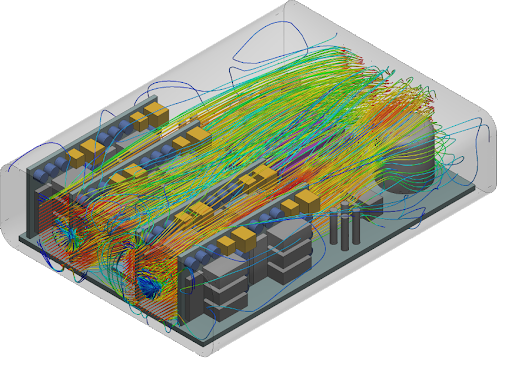
Fans and heat sinks are widely used in electronics for active and passive cooling, to keep the temperature within specified limits. The flow path has to be planned, with the heat sinks placed so that they don’t impede it. Visualizing the airflow and temperature distribution around different components inside the electronics enclosure enables you to identify the best possible placement of fans and heat sinks for a more efficient cooling process.
Test enclosure dimensions
For a sealed enclosure, the physical size is the primary factor in determining its ability to dissipate heat, making it a fundamental factor in thermal design. Engineering simulation tools allow you to analyze the heat flow and decide on the best dimensions of an electronics enclosure and ensure the effectiveness of the cooling strategy for semiconductors. Enclosure-specific methods are in electronics enclosure cooling and heat dissipation.
Ensure energy efficiency
Rising energy costs and the need to reduce energy consumption are driving demand for cooling solutions that are effective and energy-efficient. Thermal simulation helps you virtually test different types, dimensions, and placements of heat sinks and fans to improve energy efficiency for cooling and eliminate excessive components.
Whether passive cooling is enough, or an active solution justifies its cost and noise, is the fifth decision. It is covered in active vs passive cooling.
How electronics thermal simulation works
Electronics thermal simulation solves heat conduction in the solids and airflow or coolant flow in the fluid together, a method called conjugate heat transfer (CHT), to predict the temperature of every component for a given geometry, power map and cooling setup.
Computational fluid dynamics (CFD) simulation, in particular, has become a routine design tool for accurately predicting thermal performance in electronics cooling cases. It can, for example, be used to map temperature distribution on a mounting surface of a printed circuit board with heat-generating components and flag areas where the junction temperature of the semiconductor components could be above the maximum safe temperature specified by the manufacturer.
A thermal model needs four inputs:
- Geometry: the CAD of the boards, components, heat sinks, enclosure and the air or coolant volume.
- Materials: thermal conductivity for each solid, including orthotropic conductivity for PCBs.
- Power: the heat each component dissipates.
- Boundary conditions: ambient temperature, inlets and outlets, fans, and gravity for natural convection.
Both methods below run in SimScale in the browser. For an overview of the application, see electronics thermal management simulation.
Body-fitted conjugate heat transfer
The CHT analysis type allows for the simulation of heat transfer between solid and fluid domains by exchanging thermal energy at the interfaces between them. Typical applications of this analysis type include heat exchangers, cooling of electronic equipment, and general-purpose cooling and heating systems. A multi-region mesh is required for a CHT simulation to have a clear definition of the interfaces in the computational domain. SimScale’s conjugate heat transfer solver (CHT v2.0) calculates the temperature field through all regions at once in a fully coupled manner, no matter how many solid components and flow volumes or cavities a model has, which speeds up convergence.
Simulating electronics cooling has a particular difficulty. Electronic components have many little parts and details such as pins, chip markings and plate-through holes. These components are too small to influence the heat transfer and flow behavior. It is possible to include them in the simulation, however, this often leads to low-quality meshes or very resource-intensive simulations which often fail. Therefore, a typical step in electronics cooling simulation is to defeature the CAD model so that it can be meshed easily. Defeaturing and CAD cleanup are tedious and time-consuming tasks.
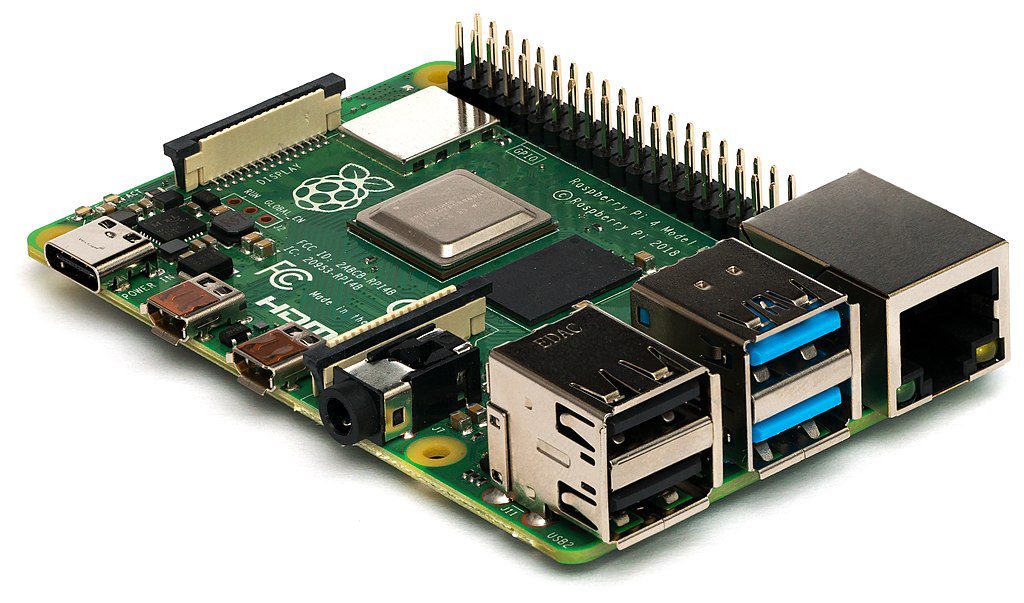
Setup steps for body-fitted CHT, including mesh settings and choosing CFD software, are in CHT best practices.
Immersed boundary method (IBM)
The Immersed Boundary Method (IBM) is an analysis type available on the cloud-native simulation platform SimScale. It allows for the simulation of heat transfer between solid and fluid domains by exchanging thermal energy at the interfaces between them. While in standard CFD and FE simulations the domain is discretized using body-fitted meshes, IBM uses Cartesian meshes where the elements are oriented parallel to the Cartesian directions. The geometry of the simulated device is immersed into the Cartesian mesh. The mesh is resilient to geometrical details and does not require CAD simplification even for very complex models.
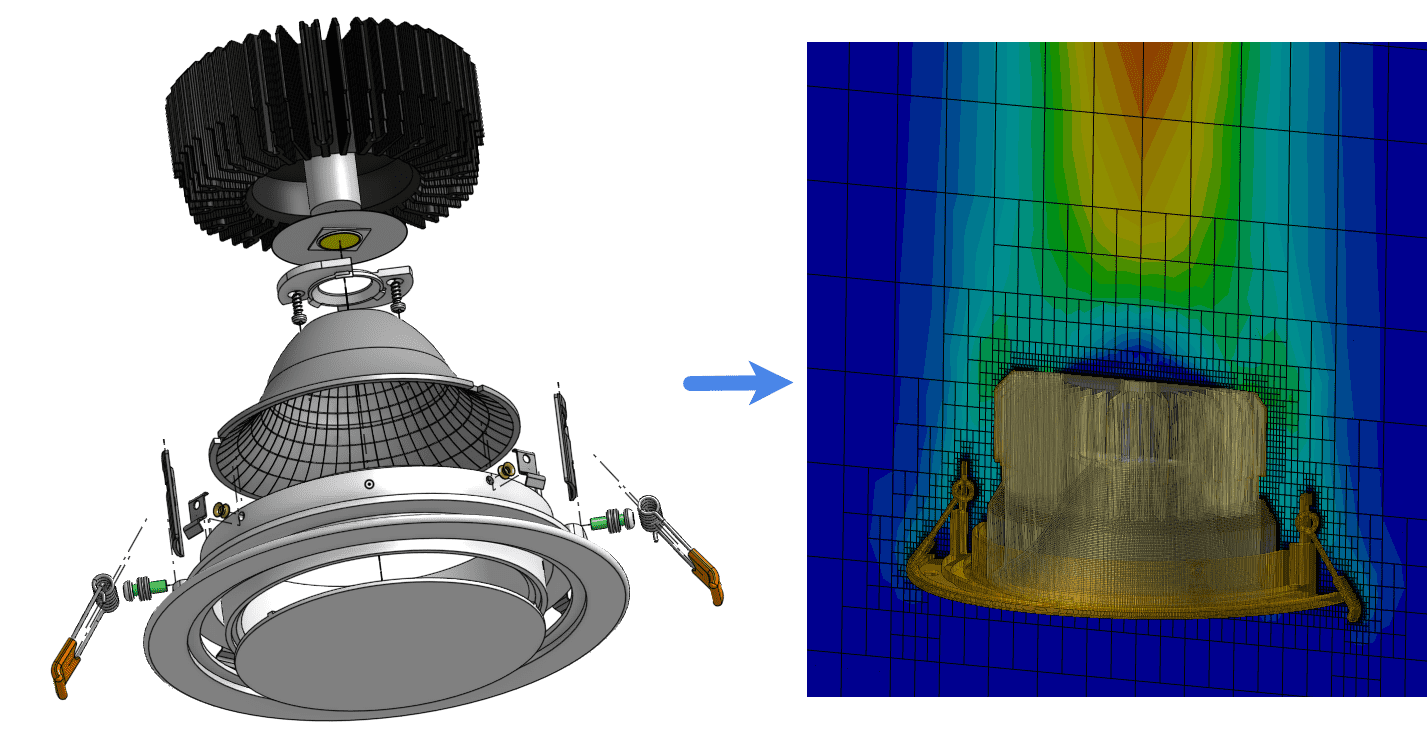
By using the IBM solver in SimScale, an engineer can skip the CAD-cleanup phase of the simulation preparation, which can often take several hours. Small gaps around fasteners and gaskets are typical of manufacture-ready and also early-stage design CAD. They would normally have to be defeatured to avoid low-quality body-fitted meshes; the IBM solver handles them as they are.
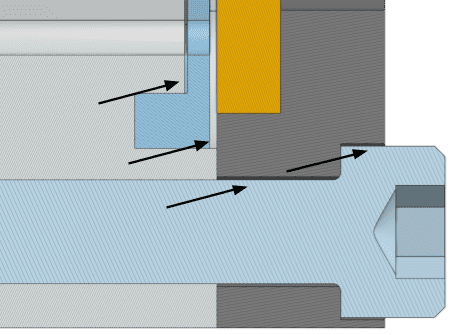
| Body-fitted CHT | Immersed boundary method | |
|---|---|---|
| Mesh | Multi-region mesh that conforms to every solid and fluid region | Cartesian mesh with the geometry immersed in it |
| CAD preparation | Small details usually defeatured first | Detailed or unclean CAD used as it is |
| Typical use | Verification on clean CAD, cases that need a fine near-wall mesh | Early design comparisons on detailed CAD |
| Learn more | CHT best practices | Immersed boundary method |
The CHT analysis of a Raspberry Pi using IBM tutorial walks through an IBM setup step by step.
Running design variants in parallel
SimScale is cloud-native, so simulations run on remote servers and every simulation gets its own virtual machine. Ten design variants take about as long as one. There is no software or hardware to install or maintain, since SimScale runs entirely in your browser.
For thermal engineers, this can mean testing different component placements or heat sink and fan orientations and evaluating their effect on thermal performance. They can also test multiple variations of heat sink material or designs, different fans, and casing designs. CAD associativity allows engineers to design and simulate iteratively: when switching between geometry versions imported from Onshape, SimScale keeps as many assignments as possible (materials, boundary conditions and power sources), which makes comparative simulations efficient.
Three practical barriers usually keep thermal simulation with specialists:
- Accessibility: traditional software needs to be installed locally on expensive high-performing computers, the majority of which remain idle most of the time. With SimScale, all computations run in the cloud, and all that is needed is a web browser.
- Operating costs: standard commercial simulation software packages are expensive. With SimScale, there is an option to start simulating right away with a free Community plan.
- Know-how: most simulation tools are designed for experts and experienced simulation engineers. To bridge that knowledge gap, SimScale offers a large public projects library and free learning resources.
Modeling fans: fan curves and operating points
A fan runs at its operating point, where its fan curve crosses the system resistance curve of the enclosure, so a thermal model needs the manufacturer’s fan curve to predict how much air reaches the components.
Forced convection cooling is an essential component of modern electronics where high power density devices and enclosures generate heat that needs dissipating. Fan performance can be complex and based on several variables that need accurate representation in any modeling and analysis. Fan manufacturers provide a fan curve that describes the relationship between static pressure, power demand, speed, and efficiency values per flow rate. The pressure flow characteristics described by manufacturer fan curves dictate how the volume flow from a fan is affected by pressure drop. Most fan manufacturers provide this data based on standardized testing according to international standards.
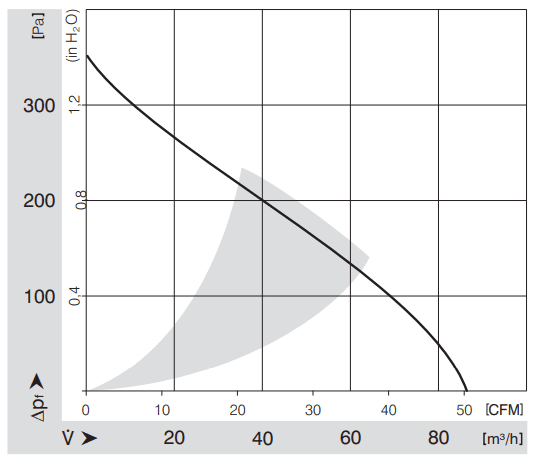
The enclosure has a curve of its own: its pressure drop rises with flow rate, roughly with the square of the flow rate, as air passes boards, heat sinks and vents. The intersection of the two curves is the flow rate the fan will deliver in that enclosure. Engineers evaluating different fan types and sizes in their device designs must be able to account for the fan curve and trust that it is a true reflection of how the fan might perform in real-world conditions.
Three ways to model a fan
Fan behavior can be simulated in several ways in SimScale:
| Method | What it does | When to use it |
|---|---|---|
| Fixed flow inlet | A velocity inlet with a direct mass flow, fluid material properties and ambient temperature at the fan location | Early estimates when the flow rate is known |
| Fan boundary condition | A fan inlet or fan outlet with fan curve data uploaded in tabular format | Fans placed at the edge or outside of the enclosure domain |
| Momentum source | A volume that drives the flow, defined by an average velocity or a fan curve | Internal fans embedded within the model |
In some cases, modeling the fan as a momentum source might be needed. Momentum sources can be used to simulate fans, ventilators, propellers, and other similar fluid acceleration devices without having to model the exact geometry of the device. For instance, users might want to model a fan whose dimensions and output velocity are known. An external flow domain is needed here to act as the air supply for the CAD opening where the fan would be, and a momentum source is used to define the flow behavior. Users can upload the fan curve, decide which direction the flow is going, and add a geometry primitive cylinder as the source. The external flow domain is used because flow enters the fan as it would do in reality, where the fan inlet is the interface of internal and external boundaries.
Deriving the operating point with a flow rate study
Simulation can also derive the fan operating point explicitly. A flow rate study simulates the enclosure at several flow rates to find the pressure drop at each and build the system resistance curve. Using the parallel simulation capabilities in SimScale, you can run multiple operating points simultaneously and evaluate how efficient different fans are for cooling and whether they adequately cool the chips in the enclosure. This approach is instrumental when the full fan curve data is not available or to assess in-situ fan performance in the system or device (the manufacturer data is for a simple test setup).
A simplified evaluation might look like this:
- Use the original CAD model and a fan curve as the baseline case
- Derive operating points from simulation
- Derive the system resistance curve from a flow rate study
- Compare cooling efficiency with different fan models
- Compare to directly uploading manufacturer data
The on-demand webinar Keeping Your Cool: Electronics Cooling Simulation with Fans demonstrates these fan modeling features.
Worked examples
Three worked examples apply these methods: a Raspberry Pi cooled by 30 mm fans, a forced-air electronics cabinet tested at three inlet flow rates, and a server CPU cooler.
Raspberry Pi: comparing two fans
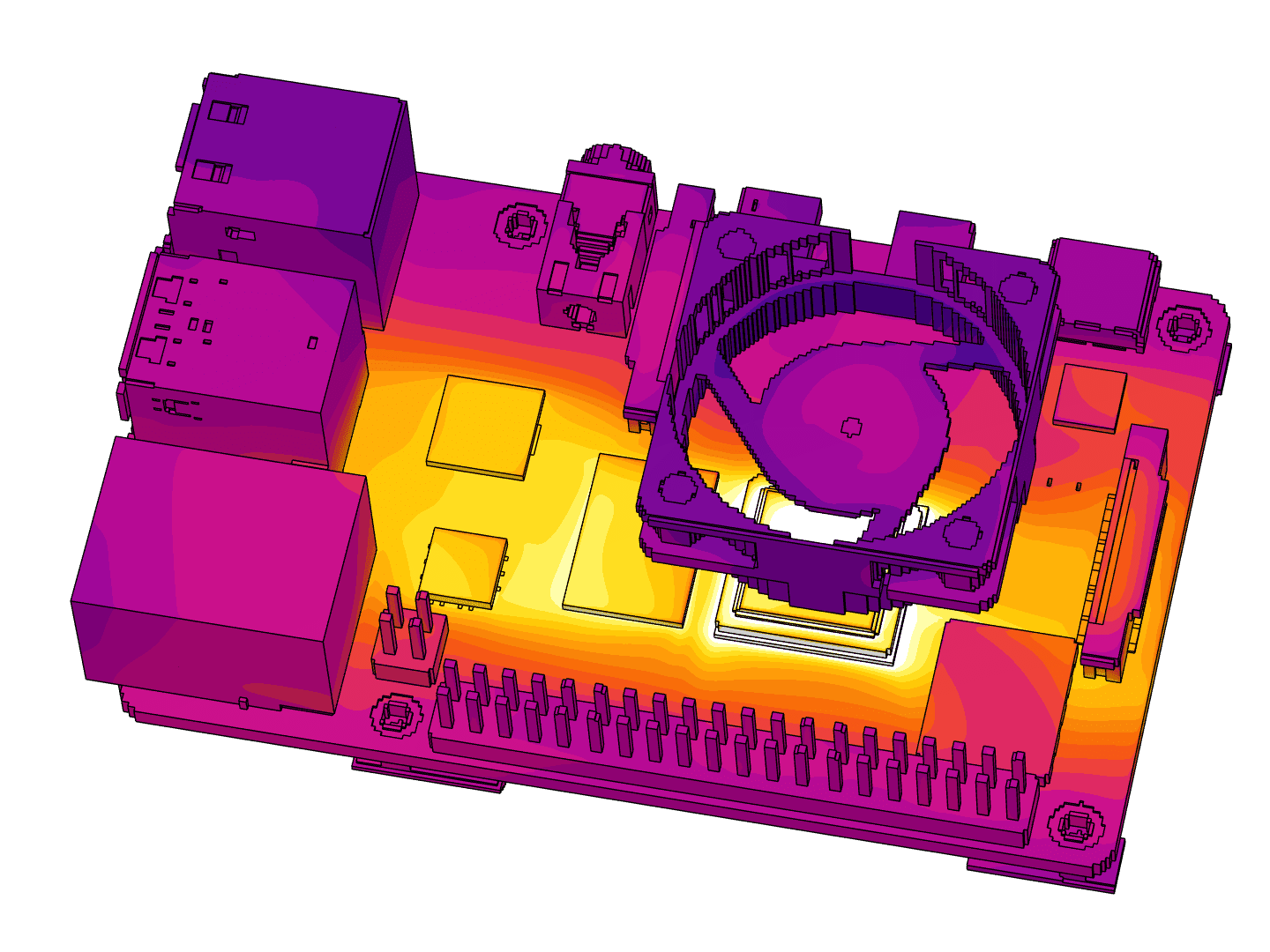
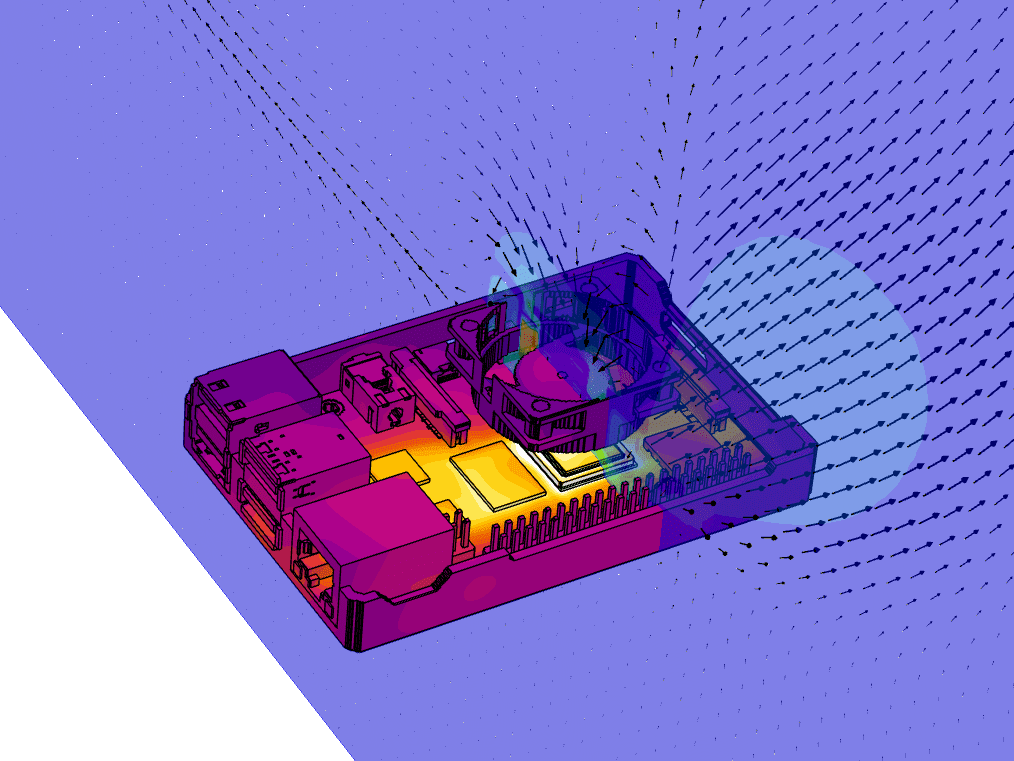
To demonstrate some of the fan modeling features in SimScale, we have simulated a Raspberry Pi computer using a publicly available 3D model of the device taken from GrabCAD. A conjugate heat transfer simulation with forced convection (fan) is used to model the computer using standard 30 mm fans for cooling. We have used manufacturer data for the fan performance, which comes in four different model types; each has a fan curve providing data on volumetric flow rate and pressure drop (static) at ambient conditions. We have taken the 3D model and simplified it using the CAD mode editing features in SimScale. The study is not interested in geometric changes to the enclosure, only in fan and cooling performance.
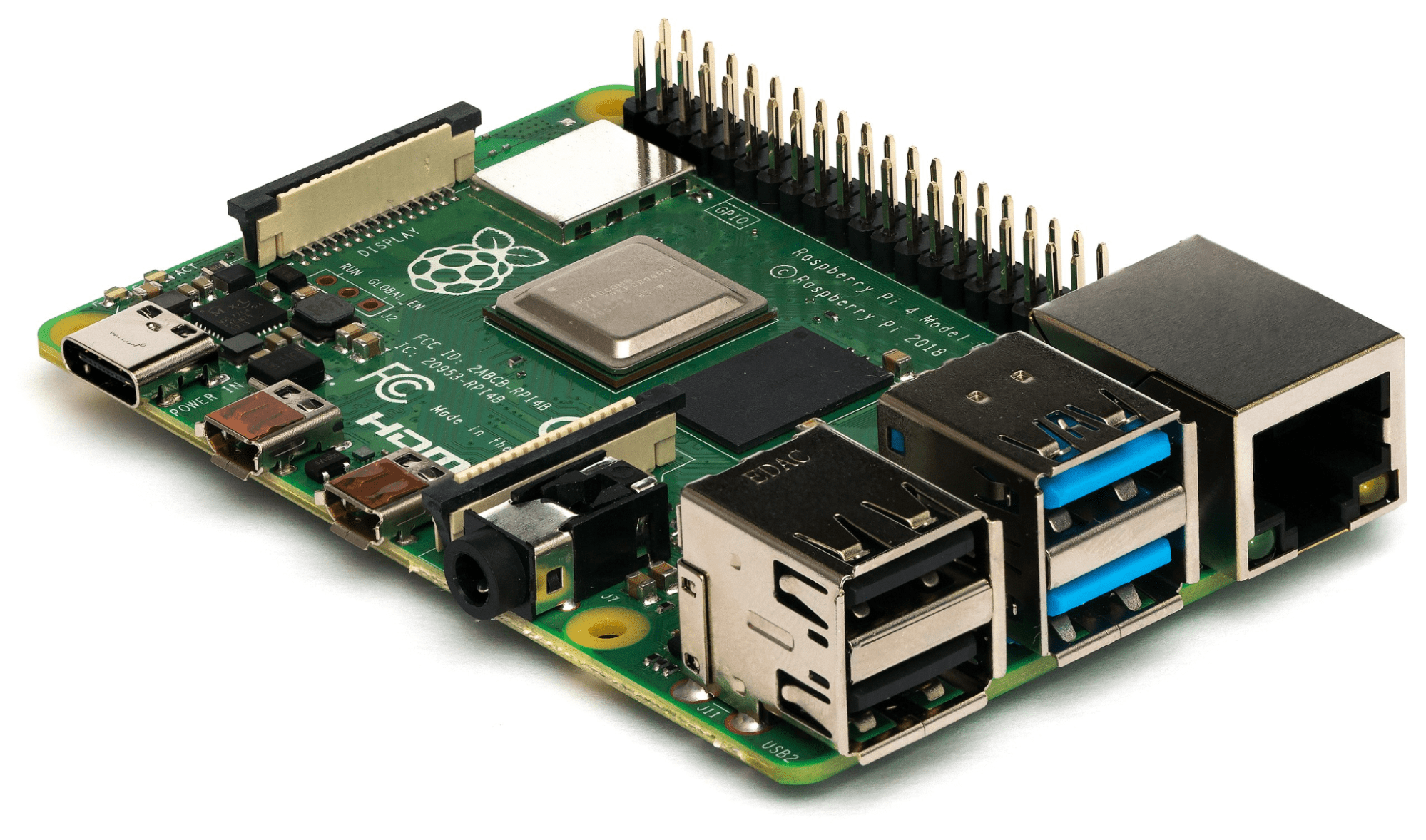
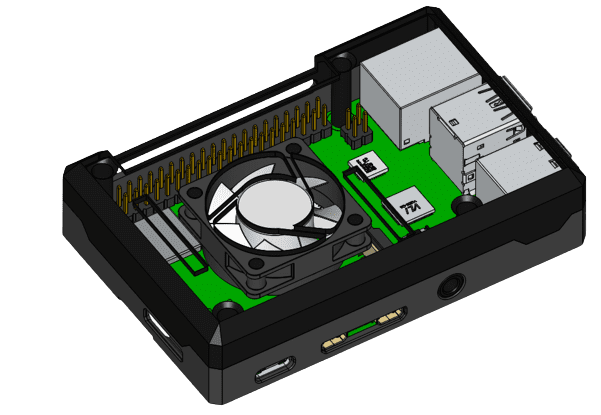
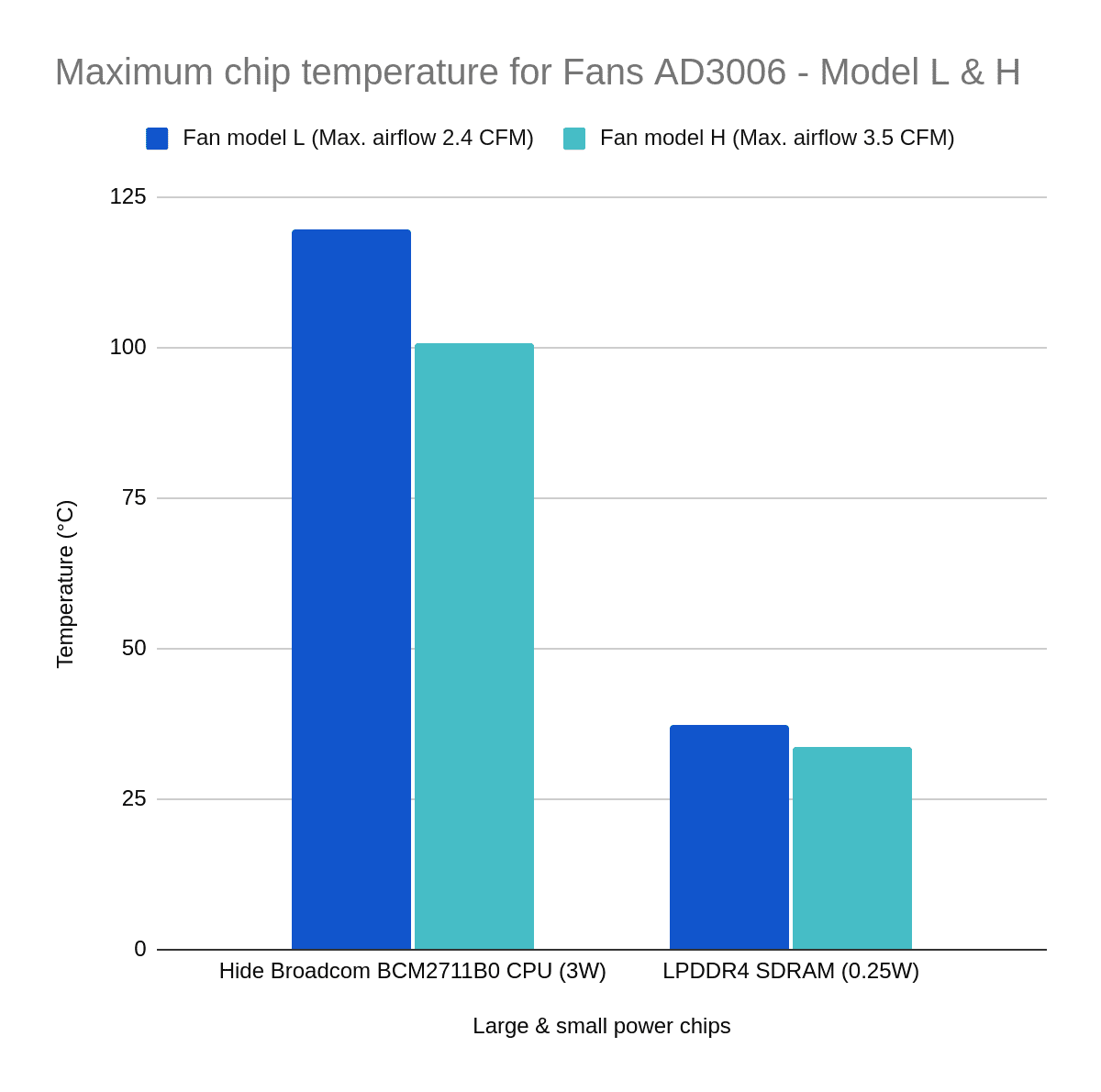
With the interfaces adequately defined, SimScale generates the multi-region mesh automatically, in this case a five million cell mesh. For the simulation setup, fan inlet and pressure outlet boundary conditions are used, air is used for the flow region, and several materials are specified for the chips and electronic components, including copper, PCBs, silicon for chips, and aluminum for heat sinks. Power values represent the CPU (3 watts) and smaller chips (0.25 watts). The air inlet is ambient at 19.85 °C, and a CSV file is used to upload the fan curve.
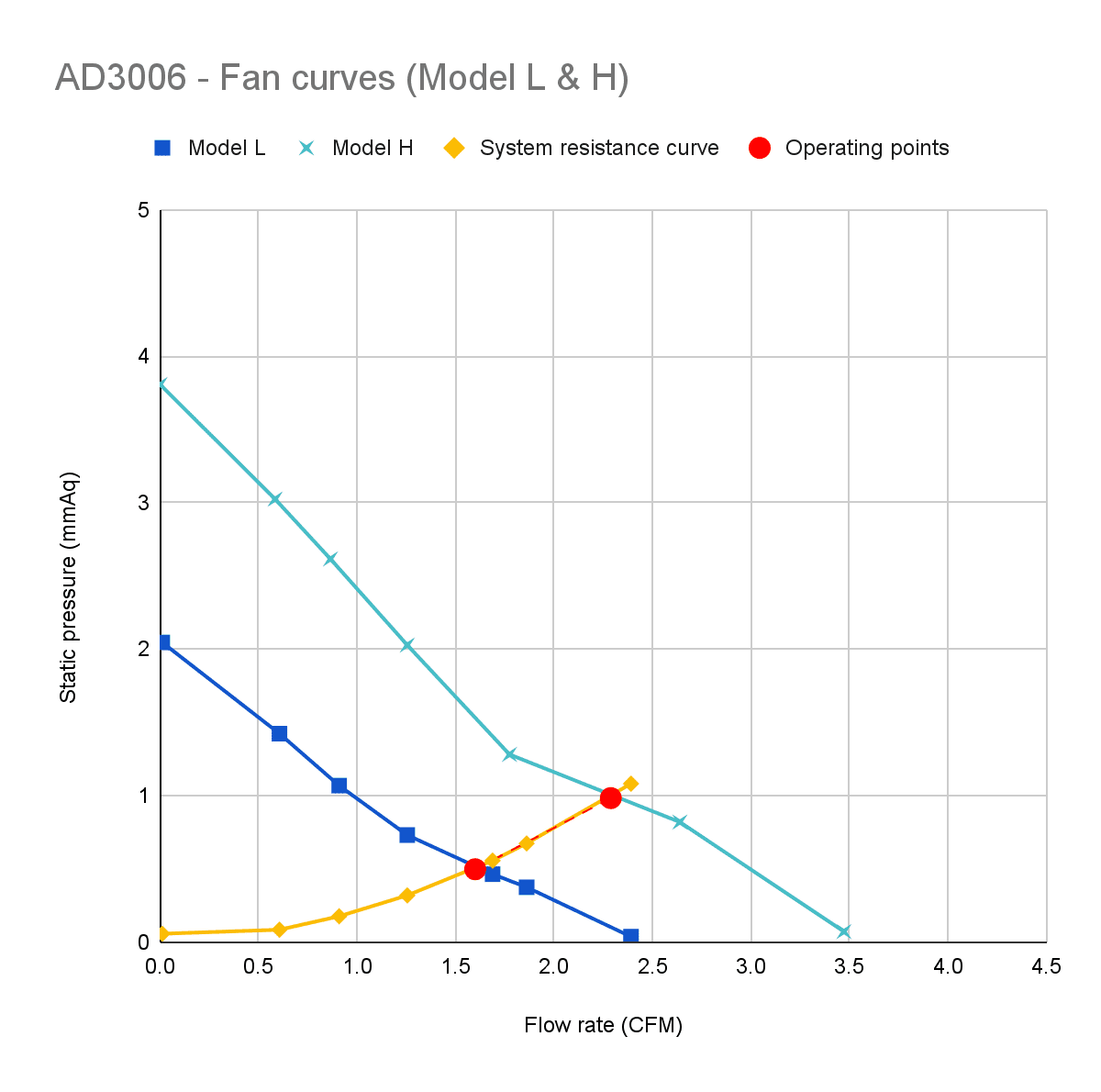
We can visualize heat removal on the chips by looking at surface area average temperatures. The results show up to 392 K on the CPU (max). SimScale also extracts point-specific data and the pressure drop across inlets and outlets. Fan inlets show a 4.78 pascal (0.5 mmAq) pressure difference at a flow rate of 7.55e-4 m³/s, and this matches the fan curve data sheet for the baseline model (L). The fan outlets are at 0 gauge pressure as intended. Switching the fan curve data to a stronger fan (H) gives a 10 pascal (1 mmAq) pressure drop. Running ten simulations of different operating points in parallel, we generated the entire system curve for the Raspberry Pi in two hours (Figure 9). The stronger model H fan is better at removing heat from the chips.
Electronics cabinet: forced-air cooling at three flow rates
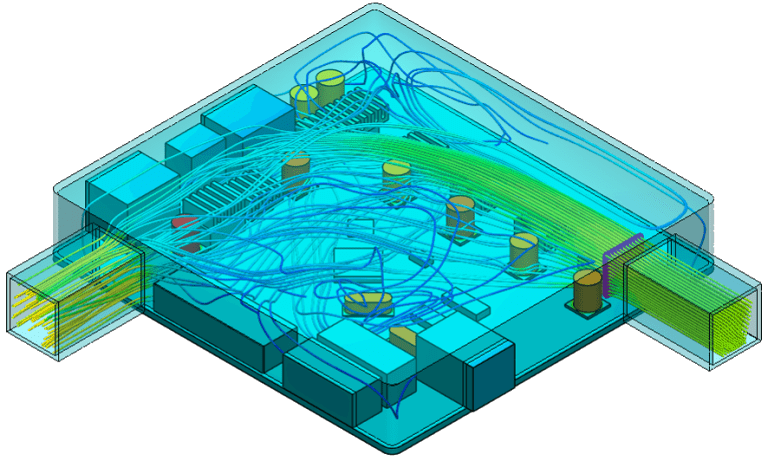
This project investigates the air-cooling performance of an electronic cabinet, including heat sources, by forced convection. The steady-state 3D viscous flow problem involving coupled heat transfer between the solid and fluid media is solved with the conjugate heat transfer solver in SimScale. The enclosure has the following overall dimensions: W x L x H = 1.5 m by 2 m by 0.5 m.
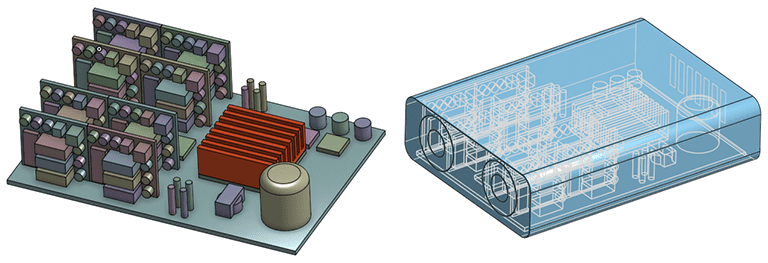
To solve this problem, a hex-dominant parametric mesh was created. A mesh for a conjugate heat transfer simulation requires all the solids to be meshed as separate regions. Thus, a multi-region mesh is created with interfaces automatically detected between the different regions.
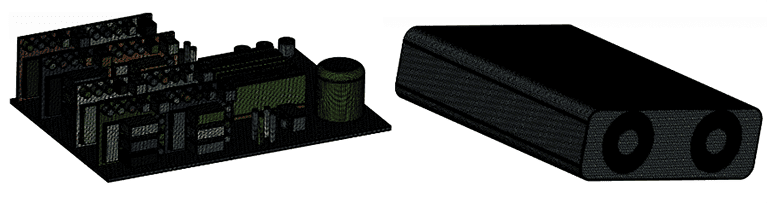
The CFD simulations presented here have used 3D conjugate heat transfer with forced external air convection and solid conduction. The following parameters were used in the simulation setup:
| Material | Thermal conductivity (W/m·K) |
|---|---|
| Silicon | 148 |
| Copper | 401 |
| Tin | 67 |
| FR-4 (PCB) | 1.4 |
| Component | Quantity | Total power (W) |
|---|---|---|
| Chip 1 (5 W) | 6 | 30 |
| Chip 2 (8 W) | 8 | 64 |
| Capacitor 1 (2 W) | 8 | 16 |
| Capacitor 2 (5 W) | 48 | 240 |
| Chip 3 (3 W) | 16 | 48 |
| Transformer (6 W) | 1 | 6 |
| Integrated circuits (10 W) | 24 | 240 |
| Total | 111 | 644 |
The results for temperature distribution, flow vectors, and streamlines are illustrated below.
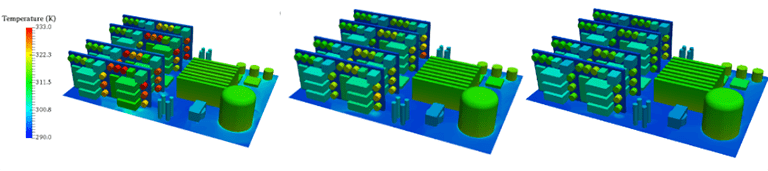

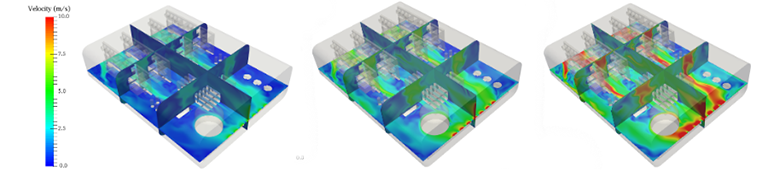
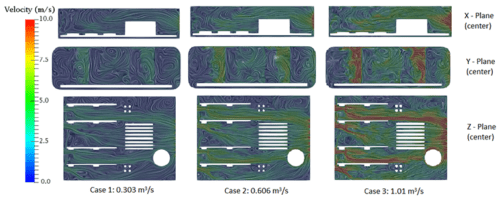
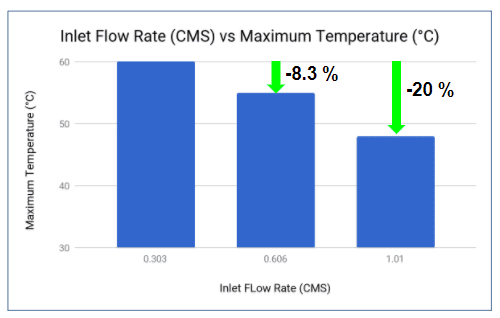
This project demonstrates how, in a matter of hours, simulation finds the fan inlet flow rate that reduces the maximum temperature inside the cabinet. Doubling the fresh air inlet flow rate from 0.303 m³/s to 0.606 m³/s lowered the maximum temperature from about 60 °C to about 55 °C. At 1.01 m³/s, it fell to about 48 °C. The cost side matters as well: by the fan affinity laws, pushing 3.3 times the flow through the same system takes roughly 37 times the fan power, which is the trade-off behind the energy efficiency decision above.
Since the expected life of any component is affected by the temperature at which it operates, managing heat becomes a critical factor in the design of high-power electronics.
Server CPU cooler
Forwiz System used simulation to test and validate a CPU cooler design for high-end server computers. The team ran more than 100 simulation runs and design variations, and the simulation results matched well with the experiments performed later. The full case, including heat pipe and fin changes, is in CPU cooling system design.
The SimScale Public Projects Library has a wide selection of free simulation templates covering various aspects of thermal design, electronics cooling, heat sink design, and more.
Customer results
OnLogic, Spark and QRC Technologies used SimScale thermal simulation in place of rounds of physical prototyping on electronics products. Their results: 95% accuracy against physical product testing, 75% of testing time saved, and 4 to 6 weeks of engineering time saved.
OnLogic: rugged edge computer within 95% of physical testing
The thermal requirements OnLogic set out to meet for its Karbon 700 high-performance, rugged edge computer were beyond any it had tried to achieve before. The team tested multiple heat sources and evaluated the thermal performance of the chassis in a low-airflow environment, designing the simulation for a worst-case installation scenario with conjugate heat transfer. It ran 3 to 5 mechanical design iterations in parallel within a week, and a simulation took no more than 12 hours.
OnLogic ended up within roughly 95% accuracy of actual product testing performance. A design feature that gave the same thermal results with less material saved an estimated $3 per system on thousands of units. Read the OnLogic case study, or listen to Erick Kopff on cloud-native CAE in the SimScale podcast.

Erick Kopff
Engineer, OnLogic

“Our overall impression of working with SimScale on our project is two thumbs way up. We’re already using it on new projects, and expect SimScale to be part of all future product developments.”
Spark: MIRA camera, 75% of testing time saved
Spark ran four transient heat transfer analyses on two designs of its MIRA dome IP camera, with heat generated by the LEDs and the image sensor, to see which design best matched the required operating conditions before prototyping. Not so obvious thermal issues were identified in one of the proposed designs. By not having to run physical tests for the two initially proposed designs, Spark saved 75% of its time, running all four configurations simultaneously in the cloud. Read the Spark case study.

Massimiliano Marchionni
Technical Product Owner, Spark

“We are using SimScale to drive mechanical decisions during design time. Our mechanical engineers use SimScale to test new solutions and to choose the one with a better heat distribution.”
QRC Technologies: four design iterations in one week
QRC Technologies designs enclosures for RF test equipment, which can get hot (up to 50 °C) when relying on passive cooling alone. Gut intuition and rule-of-thumb engineering were not enough: using only thermal pads between the hard drives and the boards could not stop the controller chip from shutting down as a defensive strategy. The team used simulation to test the orientation of the fins and several CAD designs, verified the model on the first prototype, and found that one of the design permutations performed worse than the original, which avoided expensive and long testing of an underperforming design. Read the QRC Technologies case study.

David McCall
Senior Mechanical Engineer, QRC Technologies

“In total, we spent about a week on 4 iterations of the design, saving about 4 to 6 weeks time of work.”
Thermal analysis for product design changed over the course of David McCall’s career, from physical prototyping as the sole evaluation path to cloud-native simulation platforms like SimScale. While David firmly believes nothing will ever entirely replace physical prototyping, especially with 3D printing innovations happening in this industry, he does believe thermal management practices will continue on an increasingly virtual and cloud-native trajectory. He discusses it in the SimScale podcast on the future of CAE in product design.
Frequently asked questions
Thermal management in electronics is the design of heat paths, materials and cooling hardware that keeps every component below its maximum rated temperature, usually the semiconductor junction temperature. It covers conduction through boards and heat sinks, convection to air or a liquid coolant, and radiation from surfaces.
Yes. For electronic devices the two terms mean the same thing and are used interchangeably. Thermal management is also used for batteries, vehicles and buildings, while electronics cooling refers only to electronic devices.
Conduction, convection and radiation. Conduction carries heat through the die, solder, PCB and heat sink; convection carries it from surfaces into air or a coolant; radiation emits it from surfaces to the surroundings, which matters most in sealed, passively cooled enclosures.
It depends on the component rating. Commercial-grade ICs are typically rated for 0 °C to 70 °C ambient, industrial grade for -40 °C to 85 °C, and AEC-Q100 Grade 1 automotive parts for -40 °C to 125 °C. Inside the device, most silicon has a maximum junction temperature of 125 °C to 150 °C. Running close to the limit shortens component life even when nothing fails immediately, so check the datasheet.
Electronics cooling is commonly grouped into four types: natural convection (passive air cooling), forced air cooling with fans, liquid cooling with cold plates, and phase-change cooling with heat pipes, vapor chambers or two-phase immersion. Thermoelectric coolers are sometimes listed as a fifth, active option.
Cold plates usually use water or a water-glycol mixture, which flows through the plate and never touches the electronics. Immersion cooling uses dielectric fluids that do not conduct electricity, such as synthetic hydrocarbons, mineral oils or engineered fluorinated fluids, because the components sit directly in the liquid.
Start by lowering the thermal resistance along the heat path: a good thermal interface material, copper spreading in the PCB and a heat sink sized for the available airflow. If natural convection is not enough, add forced air, and move to liquid cooling for the highest heat loads. Simulation shows which change lowers the hot spot temperature before you build it.
Related resources
Download the white paper Electronics Cooling: The Ultimate Guide for a complete overview of modern electronics cooling.
Tutorials
- Thermal management tutorial: CHT analysis of an electronics box
- Thermal management tutorial: CHT analysis of a Raspberry Pi using IBM
Webinars
- Keeping Your Cool: Electronics Cooling Simulation with Fans
- This Might Get Hot! Thermal Simulation of High Power Density Electronics
- Evaluate Electronic Cooling: Natural Convection and Fan Cooling
- Thermal Simulation With Immersed Boundary Method
- Electronic Packaging Design and Cooling with CFD, with a live demonstration of the platform by SimScale’s CEO David Heiny